Home Blog Page 88

Tricking Out Your Lulzbot 3D Printer

2
Lulzbot top spool holder
Lulzbot Taz 5 top spool holder, designed by author. Published http://www.thingiverse.com/thing:1294036

3D printers are amazing tool on their own, but like any piece of commercial hardware they scream out to be customized for a better user experience.
Lulzbot taz 5 3D printers are known for their ability to be customized. The printers themselves are made from many 3D printed parts which are available open source from the company website. Other users have contributed to the universe of files available to customize your printer.
For all 3D printers, here is a set of improvements that I recommend that you 3D print to improve your experience.

1. Tool Box 

       Every printer needs a set of dedicated tools close at hand while printing. This tool box should hold at least your putty knife, pliers, hobby knife, and picks. I recommend that you also have a flashlight, wire cutters, tape measure / calipers, and a set of  metric Allan wrenches.

Taz 5 y-arm tool tray - lulzbot taz 5
Taz 5 y-arm tool tray made by the author. Found online http://www.thingiverse.com/thing:1012326

There are free files available on all file sharing sites as well as the manufactures site. For my Lulzbot Taz 5 I decided that a tool tray under the y-arm would be the easiest to get to. It slides under the y-arm, but keeps them all next to the build plate. My tool tray can be found here.

2. Spool Holder

    The factory standard spool holder is designed to fit the factory filament spools. They tend to be bars or tubes that have a lot of friction and can cause filament feeding problems. While they are fine for getting started, you’ll soon find there is a whole universe of filaments. These new spools may not fit on the factory spool holder. Even worse, these off-brand filaments will not fit into the cartridge holders of exclusive 3D printers like Makerbot or Cube.

Lulzbot top spool holder - lulzbot taz 5
Lulzbot Taz 5 top spool holder, designed by author. Published http://www.thingiverse.com/thing:1294036

Having a flexible external spool holder will give you more options when you order filament. I found that Colorfabb has bulk deals on 2.2 kg spools. However, these behemoth (300 mm OD) spools take up a lot of space on the side of my Lulzbot. I also did not like having spools on the side of my printer, so I decided to make a top-feeding spool holder for my printer. This spool holder is beefy enough to handle the heaviest spools of filament, and also gives me the clearance I need to use the full build volume of the Taz 5. My Taz 5 spool holder can be found here.

3. Spare Parts 

     All 3D printers have parts that you can 3D print a replacement for. When you research your 3D printer, look around to see what parts wear out first on your printer. You can then print replacements while your printer is new. If you do not like the flat black coloring of your Lulzbot, this can be a great way to make the machine you will spend hours with more colorful.
The Wade extruder on Lulzbot has one part that wears through the most. The idler arm that holds the filament against the hobble bolt tends to get chewed through at the top. Over time this may wear through, or catch on smaller diameter filaments. The idler arm is easy to replace, and even easier to print. I printed the replacement in clear colorfabbXT to get more light inside the print head. The files for the lulzbot taz 5 idler arm can be found here.

4. Lights 

     Different printers will or will not have a light in them; even then it’s not enough light. While you can play around with desk lamps to start printing, having a dedicated light inside your printer will help greatly. If you plan to do time-laps videos, you will need a dedicated light source inside your printer. Look at a set of LED strips to illuminate your print at different angles. I found that it helps to also have a flashlight on hand. This way you can quickly check if layers are going down right on the print.

5. Décor`

     If there is one truth about 3D printing, it is this: You will spend a lot of time at your printer. So decorate it with pieces you can easily move around. While you can use stickers, I’d avoid them unless you want to deal with the gunk they leave behind.

Corner bracket - lulzbot taz 5
Steampunk corner bracket designed for Lulzbot printers. From http://www.thingiverse.com/thing:160502

Décor’ pieces are a great way to explore different techniques in 3D printing. For mine I changed the factory black corner plates with these steampunk themed corners. I practiced printing in two colors as well, which helps my printer look a bit less black. This will help you enjoy your printer; even after a print turns into a blob after 4 hrs.

You can practice using your 3D printer while making these parts. Even if they don’t turn out well, you’ll be the only one to see them.

Fashion and 3D printing: Print your own clothes.

3
Darkness collection by Rocío Izquierdo

Would you like to make some 3d printing clothes?

It´s not surprising to read that clothing has become an essential way to express ourselves freely, but have you ever thought about what does it involves? Yes, we are able to send messages to the people through what we wear, just take a look about what people use to say:

“If you want to look like a professional person, wear a suit”.

“If you want to look like a sophisticated person, wear a pinstriped scarf”.


In resume: clothes not only cover our intimate parts like Adam and Eva did. Clothes define us!

That’s why nowadays we would like to wear custom clothes, with unique patterns and fully customized designs, or what is even more original: clothes made by ourselves!

Designers already know the change that 3d printing clothes are bringing in all manufacturing processes, they don’t want to stay behind. Some of the results below:

Danit Peleg project; Danit is a design’s student at Shenkar School in Tel Aviv (Israel). She created a fashion collection 100% made with 3D printing technology in her home using only RepRap printers (and a lot of Israeli creativity).


Dani Peteleg Project - 3d printing clothes
Dani Peteleg Project  – 3d printing clothes

Cool, isn’t it?


She used several sheets of FilaFlex a malleable and soft filament; Dani worked for more than 2000 hours to print her dresses, finally she managed to have five sets with cool geometric patterns that includes:

And now, The Spanish girl Rocío Izquierdo just put back up the words:

Fashion and 3D printing


Thanks to her fashion collection called: “Darkness”, she also used the FilaFlex filaments as its raw material. Even though her “Darkness” collection are only fashion accessories, Rocío says his next “Darkness” collection will be fully made with 3D printing technology.


Darkness collection by Rocío Izquierdo - 3d printing clothes
Darkness collection by Rocío Izquierdo – 3d printing clothes

She knew this technology on her design school and starts using SolidWorks Software; met a lot of great projects since prosthetic devices to footwear, and thanks to the truthful support of her family and team members of Relieves3D, she began the production of this magnificent “Darkness collection”.


Darkness collection by Rocío Izquierdo - 3d printing clothes
Darkness collection by Rocío Izquierdo – 3d printing clothes

¿What kind of clothes would you like to 3D print?


-Answer in the comments.

Sintron Prusa i3 Review

2
The Sintron Prusa i3 3D printer

The Sintron Prusa i3 is a build it yourself Prusa i3 kit which is one of the most popular 3D printer on UK Amazon. Sintron has the same printer listed twice, one with Amazon Prime delivery and one without. The one with Prime delivery is about £20 more. Both seem to be the exact same printer. The printer is similar to other Prusa i3 variation. It features a heated bed, MK8 extruder which is direct drive, 0.1 to 0.3 mm layer height with a good sized 200 x 200 x 180 build volume.

Assembly – sintron prusa i3  

The assembly of the printer was surprisingly easy and straight forward. I emailed Sintron and they sent me a link to password protected Dropbox files of instructions. These were very clear and mostly easy to follow with basic electronics knowledge and some common sense. One problem was that the endstop switches for the Z,Y and X axis were not documented very well, however Sintron was happy to send my pictures and written instructions on  how I should connect them. This is my first 3D printer as well as my first 3D printer build, I managed to get the printer built within a few days. Like I said I do recommend a very basic knowledge of electronics as well as the ability to solder, although 90% of the electronic assembly is done with plugs. Like any Prusa i3 build you will need some initiative to complete the printer but the instructions will cover just about every step.

The Frame  – sintron prusa i3  

The frame is made out of laser cut acrylic and the standard metal rods as well as 3d printed parts. The frame has two main parts: the acrylic frame with the X and Z axis and the metal rod base joined by 3d printed corners which holds the Y axis. The Y axis is very sturdy and heavy, it is all constructed by metal threaded rods. The Y Axis is held on by 2 smooth rods attached to the base. The Y axis is a heated bed which I am able to get to about 80*C, you are required to cover it in painters tape, kapton tape or but some glass on it. On the other hand there is the acrylic half of the printer. This side of the printer is a bit more flimsy than the Y axis. It holds the 2 Z axis stepper motors and the X carriage, the acrylic frame has several pieces which join by small bolts and nuts which are very fiddly to screw in. One problem I have noticed is how the two parts join together: The acrylic frame slots onto a pair of the threaded bars on the base of the printer. This is supposed to be held in place a nuts and fender washers, however I didn’t get any fender washers in my kit so I used regular washer. This makes for a flimsy joint which allows the acrylic frame to sway back and forth, this means you will have to secure it some how so it doesn’t interfere with printing. Another problem I encountered was the fact I didn’t place the acrylic frame perpendicular to the y axis, this caused the printer to print circles in a weird oval shape, the problem is mostly my fault as it was my first printer and I had no prior experience with 3D printers, let alone building one.  Other than these 2 issues which are an easy fix the frame is (in my opinion) looks professional and strong.

base of Sintron Prusa i3 - sitron prusa i3
Base and acrylic frame joint – sintron prusa i3

The Electronics – sintron prusa i3  

Like just about every reprap printer this Prusa i3 uses a ramps 1.4 board which slots on top of a Sintron made ‘arduino’ mega 2560 which comes programmed with the firmware. The printer runs of an LCD interface using just one dial and an emergency stop switch. The LCD screen is clear and bright as well as easy to navigate. The LCD display also houses the SD-card reader which means that the printer does not need a computer to run it, however you can plug it into your computer if you so desire.

The cable management is up to the builder, there are holes cut into the acrylic which allow you to run wires neatly. Saying that, it is very hard to get the cable management to a good level and you will have to incest some time into doing this as it will make repairs and general use in the future much easier. The cables going to the print head are attached loosely and I recommend either fitting some kind of cable management sheath or printing out a cable chain which was what I did.

The electronics are reliable as long as there are not any user made short circuits. With the ramps 1.4 board I received in my kit the polyfuse (a polyfuse is a fuse that can be used multiple times without a need to replace it) installed in the heated bed circuit, this fuse was faulty and would trip every time I tried to heat the bed. This meant that I could not use the heated bed. I once again emailed Sintron about this and they were happy to send me 2 new fuses for free and they even covered the shipping cost.

In the package you get a generous amount of jumper wires to aid you in the wiring which I found very helpful and I still have plenty left. One part of the electronics I do not like is the endstops for the axis’s. The switches are physical switches which is not good for the accuracy of setting the Z axis height. If the Z axis home height has to be accurate otherwise  the hot-end will drag across the heated bed or the first layer will be too high up and will not stick to the bed causing a massive mess of plastic. However there is a more manual solution to this problem which is far from ideal but it does work: You need to turn on skirt and set it to at least 2 perimeters, by doing this your printer will extrude a out line of the model you are printing about 1cm away from it. What this allows you to do is to is to pause the print on the LCD controller and change the Z height and adjust it to first the correct home position by using a piece of paper then to set it to the correct first layer height (which may be different to your main layer height) mine is usually 0.3mm. This should solve the issues with the Z axis home position.

Z endstop l - sitron prusa i3
Z endstop on Prusa i3 – sintron prusa i3

Customer service – sintron prusa i3  

One major advantage to buying this printer is the outstanding customer service. It is the best customer service I have ever seen. I was in a long chain of emails to someone called James who answered every question I had as well as sending me parts if they were faulty. I had problems some issues with my printer and they would send me out a part whenever necessary, they even sent me a new mega 2560. I would highly recommend buying from this seller, you can get their email on their website.

Print Quality – sintron prusa i3  

The prints I have achieved with this printer is amazing. With much tinkering to my printer I have been able to print precise, accurate models. With this printer printing printing non-mechanical parts and basic models are a breeze. Printing mechanical objects can be a bit more tricky, I have been able to print  objects with moving parts inside such as a rotating scuba hose holder, a Geneva drive model (a mechanism that changes continuous motion into intermittent motion) and recently a ‘mostly’ working adjustable wrench. I recommend playing around with extrusion multiplier to get the best prints ( I use 90% in Cura for PLA). With this printer, like any you will get failures and this will happen more likely than a pre-built machine. However the knowledge you gain from the failures is invaluable as the best way to learn is to learn from your mistakes. The printer is able to preform well in PLA, ABS, PETG and flexable PLA from my experience.

sample prints - sitron prusa i3
Prints printed on the Sintron Prusa i3 – sintron prusa i3

Conclusion

Overall the printer is really good: It can print complex shapes and figures as well as complex mechanical parts if you tinker around a bit. The fact you have to build it and make it work well, as well as giving you satisfaction, gives you knowledge on the ins and outs of your machine and how it works, how to make it better and how to fix it. The print quality I have achieved with the printer is very good as you can see from the image above, but I feel like it’s unfair to compare it to a printer like an Ultimaker because those kinds of 3D-Printers go into the regions of £1000+ at least and for about £ 270 and some time and effort you can achieve similar results to a high end printer like that. So whether you are looking for your first printer or another one for your fleet the Sintron Prusa i3 should be put on your short list.

The Good, Bad, and Errors of 3D Printing

1
A bad print that did not stick to the build plate

3D printing is a fine art in a world full of beginners. Fortunately the internet is full of support and sympathetic ears from other printers.
There are many ways a print can go from a Pinterest – perfect picture to a plastic spaghetti pile. Recently Simplify 3D released a printing guide that covers the full range of issues that you can face. Different brands of 3D printers are known for their quirks that cause their own problems. Kit built printers are notorious for having all of these 3d printing errors. Among these errors  I’ll cover the ones I ran into on my Makerbot 5th gen and Lulzbot Taz 5 printers.

1. 3d printing errors: Not Extruding at Start of Print.

Print not extruding at the start. - 3d printing errors
Print not extruding at the start.

When you start printing, the filament has to be hot enough to flow into the nozzle of the print head. If your temperature settings are off for your material, it may not melt enough to flow into the head. Check the info from the filament manufacturer for the recommended settings for each filament material. When in doubt, I found it better to run your filament on the higher end of the temperature range. For example, if I’m printing PLA/PHA, the recommended range is 190 – 210 C and I run it at 200 to start.

    Fix 1: Check you temperature settings, especially when you change filaments from PLA to anything else.
Fix 2: Check that your build plate is level and offset correctly. If the head is too close to the build plate, you’ll see track marks in the blue tape. In Makerbot Desktop it can adjust the offset under the device settings. For Lulzbots, you have to adjust the offset manually.

2.3d printing errors: 1st layer is not sticking to the bed.

     The first layer is the important foundation to your print. Always monitor your print to make sure this layer goes down flat and smooth. If your print has complex curves, circles or tight angles on the base, you will really need to monitor your 1st layer.

A bad print that did not stick to the build plate - 3d printing errors
A bad print that did not stick to the build plate

   Fix 1: Slow down your print speed. I know when you have a long print it is tempting to throttle up your printer. But if it goes faster than the plastic can bond, you end up with a stringy glob around the print head.
  Fix 2: Clean the build plate. I use blue painters tape on my build plate, and sometime the tape loses the ability to grip the material. Other printers use glue stick, hairspray, acetone, or kalpton tape to hold the print to the bed. You have to experiment with what works with your printer to get something that works consistently.
Fix 3: Heating and cooling. My first printer, a Makerbot 5th gen, had a unheated glass build plate. Without that slow plate heating, the PLA shrunk like mad, especially on the first print of the day. Other materials like ABS you have to keep warm while printing or they will warp. Lulzbots thankfully can heat up, which will give the plastic time to bond to the build plate. For cooling, check the fan settings. If the fan is full on at the start, that may be cooling the plastic too quickly. You can change the settings in the Gcode.
Fix 4: Brim and rafts. Small prints, or prints with holes and complex shapes will need a brim or raft to hold them in place. With all the complex curves, the shrinkage will pull holes out of alignment and keep the shell from sticking to the plate. Explore using brims and rafts on different prints to decide what works best. Use brims if you have to use supported prints. Use a raft if you have a large or odd shaped flat print.

3. 3d printing errors: Over / under extrusion.

       This is a problem when going between different materials and diameter of filament. While Makerbots are set at 1.75 mm filament, Lulzbots can run 1.75 and 3 mm filaments.

over extruded test cube - 3d printing errors
Over Extruding filament causes uneven layers and bulges

    Fix 1: Check the settings on your slicer. I occasionally forget to do that on the Lulzbot when I go from 3 mm to 1.75 mm filament. The difference causes a thin string (under extrusion) or thick wavy blob (over extrusion) in the layers. You have to cancel the print and restart if this happens.
Fix 2: Check the flow rate. If it is over or under constantly, the print head motor may be running like it’s supposed to (Makerbot “Smart” heads are notorious for this). You can play with the flow rate to see if this helps.

4. 3d printing errors: Gaps in top / bottom layers

     Gaps in the layers make your print look like a sieve, and makes the print brittle. I’ve done this when I try to rush prints by making every shell and layer as thin as possible.

Gaps in top layer - 3d printing errors
Gaps in the top layer caused by a thin top/bottom layer.

     Fix 1: Thicken the top and bottom layers in your slicer.
Fix 2: Use more infill to support the top layers. Large gaps between infill supports are hard to bridge and can droop, leaving you with bulges or lumpy quilting textures on the top of your print.

5. 3d printing errors: Grinding filaments.

You are printing when you hear a steady “click, click” sound from the print head. If you have a Makerbot, that sound is the famous click of death from the “Smart” head. That click sound is the filament catching and grinding against the hobble bolt.

grind mark in filament  3d printing errors
Grind mark in filament, caused by wrong setting or bad filament.

    Fix 1: Check the temperature and make sure you’re printing hot enough for that material. All printers will try to force filament into the hot end, but if it does not melt you will get a jam and grind the filament. This is what kills the “Smart” heads on Makerbots.
Fix 2: Use a pick or toothbrush to clean out the teeth of the hobble gear.
Fix 3: Check the filament to see how brittle it is. Bad filament will chip and break instead of bending with the hobble gear. I’ll write more about bad filament in a future blog.

6. 3d printing errors: Clog / jam.

   This is the hardest thing to fix, because the jam tends to happen deep inside the hot end of the print head. If you hear a clicking sound and don’t see any material coming out, you have a jam. Makerbots are infamous for jamming inside their “smart” extrudes due to electronic and quality issues.

jamed nozzles - 3d printing errors
Jamed nozzles caused by bad temp settings or filament

    Fix 1: While the head is still hot, unscrew the nozzle. This will open it up to hopefully clear the jam on its own.

     Lulzbot Fix: On Lulzbots you can open the idler arm and pull the filament out while its hot. If you have a problem you will see it on the end of the filament. Hopefully you can remove any kinked or bad filament from the head without having to clean out the whole head.
If that does not work, the jam is caught at the start of the hot end. You’ll have to break out the Allen wrenches and dismantle the printer head. Carefully use a drill or punch to get the jam out of the body.

    Makerbot Fix: On Makerbots you can try to reverse the filament jam through the printer controls. When that fails, your “Smart” head may be jammed to death. You can try drilling it out after you remove the nozzle (which will void the factory warranty). After this, take a shot of hard liquor and call Makerbot customer support. You can also try a guitar E string to try to floss the jam out, but that will also void the warranty.

This is the short list of problems I have encountered while 3D printing with Makerbot 5th Gen and Lulzbot Taz 5 printers. Check the support for your particular brand for printer specific issues.

For more info on makerbots, click here. For Lulzbot, click here.

3D: Fear of Terrorism or Fear of Ideas?

1
Liberator 3D printed pistol.

      When I tell people I have a 3D printer, I get a lot of questions. Among the top 5 is “Can you 3D print a gun”?! In the US it has always been legal to make your own gun, and anyone with a drill press and some plumbing parts can make a working zip gun. 3D printed guns fall under this legal provision, provided they have a chunk of steel big enough to set off a metal detector.

Cody Wilson, DD holding liberator 3D printed pistol - 3d print a gun
Cody Wilson of Defense distributed holding the Liberator pistol.

Now thanks to 3D printing, it is possible to 3D print a gun out of plastic without the technical skills required to make a metal gun. In 2013 Cody Wilson of Defense Distributed (DD) published the digital files for his Liberator pistol. After that police departments and media tested the stealth of the gun by bringing them through metal detectors into public meeting to demonstrate their possible “terrorist” applications. The US government ordered the files removed from Defense Distributes website, but a simple search of any file sharing site will reveal the files.

3D print a  gun the fear of terrorism?

Recently the Daily Mail (DM) a UK based paper, published a quick and disjointed article about 3D printed guns. DM clams (without proof) that ISIS may be interested in 3D printed weapons. It attacks Cody Wilson and his plans to try and release a 3D printed AR-15 assault rifle in April. It should be noted that DD has already published the files for the AR-15 lower. The printed lower does not have a government serial number, meaning that it is not registered with the government (a so-called “Ghost Gun”).

The rest of the DM article jumps around, but suffice to say it hypes a lot of fear by combining ISIS and 3D printed guns.

Fear of Ideas

crazy-slow-motion-video-shows-what-happens-when-a-3d-printed-gun-misfires - 3d print a gun
3D printed Liberator pistol misfiring and exploding.

DM wrote this puff piece without any knowledge of 3D printed guns. The Liberator Pistol was never made as an assassin’s tool. DD made it as a thought experiment, legal challenge, and engineering challenge. Shooting a single .38 cal bullet out of snub nose barrel, it also requires additional barrels to fire again. The process of loading the Liberator is slow. On top of that, the barrels have a tendency to explode in the shooters hand. All of these are not properties that ISIS or other assassins consider desirable in a weapon.

      For the AR-15 lowers mentioned in the article, they are more of a concern, but not by much. They too were made as a thought experiment and legal / engineering challenge. They do circumvent the laws of the US, because they do not have or require a serial number. 3D printed lowers have made progress in their ability to fire hundreds of rounds. Online groups like FOSSCAD have produced improved versions of this lower that fire higher calibers.

3D print a gun – realitys

The strength and performance of these plastic lowers is dodgy at best. They require extensive tinkering to fit the trigger group inside of them, which takes a lot of time for uncertain performance. The 3D printed lowers take hours to print and even more time to assemble into a firing gun.

       There is no proof that terrorist are actively seeking 3D printers for nefarious purposes. When you look at the time, risk, equipment, and skill involved in 3D printing a gun, it just does not make sense for a terrorist to use one. Any terrorist wanting to cause harm will want a stable, predictable working gun. 3D printed AR-15 lowers simply cannot deliver on that requirement. Any terrorist will find a legal or illegal way to get a working gun that is ready to fire. Terrorist networks also have connections to arms dealers that can easily smuggle weapons into any country.

Fear Itself

With current 3D printing technology and materials, the public does not have a lot to fear from 3D printed guns. What DM is afraid of is the idea of 3d print a gun. DM is afraid that anyone who does not want to deal with the legal restrictions of making and owning a gun can circumvent the draconian measures in place in the UK. DM is afraid that everyone can easily find these 3D printable guns.

Ultimately DM is not afraid of a 3d print a gun used by ISIS, it’s afraid of the idea of a 3D printed gun in general.

The original article can be found here:
http://www.dailymail.co.uk/news/article-3415038/Could-ISIS-start-using-3D-printed-weapons-Pro-gun-activist-vows-reveal-online-make-semi-automatic-rifle-just-100.html

Defense Distributed can be found here:
https://defdist.org/

FOSSCAD can be found here:
http://fosscad.org/fc/

Hypersonic Aircraft: it’s closer than we expected

1
Hypersonic Aircraft
Hypersonic Aircraft

The 3D printing technology is changing the world in a very radical way, manufacturing any kind of fully customized and tailored objects according to our needs; creating new and better products is just fantastic. But personally I think there is still much ground to cover with 3D printing.

From the begining of time man has felt the need of flying, let’s face it: we all want to fly and sail the world, but we don’t have wings. So, we decided to build our own and that’s what NASA is doing.

skydiving - nasa hypersonic aircraft
people practice skydiving

Hypersonic aircraft is closer thanks to the mankind and their fervent desire of riding the sky and 3D printing gave us the tools to make this dream come true.

Orbital American aerospace Company ATK announced: 3D printing has been proved be very successful in their latest project. They are using this technology to manufacture a combustion chamber for the engine of his futuristic hypersonic aircraft at the Research Center of NASA Langley in Virginia.

Hypersonic Aircraft - nasa hypersonic aircraft
NASA Hypersonic Aircraft

Just think about having the possibility of flying from New York to London in just an hour -or going to any destination you need in less time-. Well, this is getting closer to be real, thanks to a group of people who decided to use a 3D printer to make combustion chambers.

But, why is this piece so important and how it benefits the Hypersonic Aircraft?

Well, that’s because the combustion chamber is a cornerstone for the engine of this Hypersonic aircraft. Without it, the aircraft couldn´t reach the expected speed. After the manufacturing process it was underwent for a period of 20 days as a normal engine’s temperatures and conditions,  which reach speeds over 6125 km/h.

The combustion chamber was created through a fusion powder process called powder bed serves or PFB. This process is used primarily for adding raw materials based on metal alloy powders.

 Orbital ATK says that the manufacture of this chamber design is only possible with the help of 3D printing, because doing it by hand it would take multiple parts so it would increase production time and rises costs for sure.

When the entire printing process ends the piece is removed from its excessive dust, then, is moved through a smoothing process.

Hypersonic Aircraft Desing - nasa hypersonic aircraft
NAsa Hypersonic Aircraft Desing

Just the fact than in a future we would print our own transportations makes me feel excited.

 What kind of transport do you want to print?

Romina: the Mexican Galgo who has a brand new leg

2
Romina the galgo
Romina the galgo

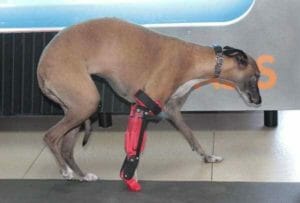
 Three-dimensional printing is a revolution in the way that we produce objects <<from the manufacturing of prototypes to products>>, including changes in the way we support social causes. A good example is the 3D printed leg as a prosthetic device,  this kind of projects involves community around the world and they always help.

The power of giving a prosthesis to someone who really needs it is magical as the kindness we once have felt for a puppy, a bird or a cat when we saw it for the first time. Because we all love animals. That’s why I’m really excited about what happened in my country, México. So let me tell you a little about Romina:

Romina it’s a Mexican Whippet Galgo who lost its front right leg on a lawn mover´s accident, (poor thing) and the left leg was seriously injured.

Imagine that your pet, your companion, your friend were to suffer in a similar way. I would definitely use my super 3D printing powers in order to help, and that´s what a group of researchers just did.

Romina the galgo - 3D printed leg

Universidad del Valle de México, university researchers decided to help Romina, they developed a 3D printed leg to replace her lost leg so she would be able to walk and run again.

3D printed leg
                   

They used a 3D scanner to design the prosthesis more precisely, so it could be tailored to Rominas injured leg. The 3D printed leg is made with silicon, but the final prosthesis is expected to be manufactured with aluminum or carbon fiber, it will be finished in a period of 3 months. Also, it might look similar to Rominas skin after being covered with a proper material.

Romina the galgo - 3D printed leg
                                         

In a press conference, the veterinarian who treated Romina said, that although the final cost of the prosthesis is not yet known, it´s expected to be cheaper than the commercial ones, by a large number of different materials amiable in 3D printing. The time of printing is about 24 hours’ time and it can be fully printed or assembled. Cool, isn’t it?

The orthopedist Beremiz Sanchez said that Romina had a reconstruction of their lost leg in Brazil, but the member had complication and muscle spasms, so they parents decide to try the 3D printing technology  and now Romina had a new leg according to her needs

¡Point for 3D printing!

Of course, Romina needs a lot of rehab, care, and love, to get used to his new leg, they need to work a lot so  Romina will feel comfortable and she can be able to play again sooner, The best about this is not only that Romina can walk again, is that this project is Open Source! so, if you are a veterinarian or a Maker and you want to collaborate, you can do it. With this, the project can live on, help a lot of animals and had a lot of feedback from all the 3D printing communities.

So, what are you waiting for?


Romina the galgo - 3D printed leg


Intro to unclogging your 3d printer nozzle part 2 of 2

1

[youtube id=”NuLD0oVw1uU” width=”600″ height=”350″ autoplay=”no” api_params=”” class=””]

Part 2 of my Video about cleaning nozzles, where i show you how its all done.  Remember to wear safety equipment when doing this please.

Intro into cleaning your 3d printer nozzle part 1 of 2

1

[youtube id=”78CcylIGuwM” width=”600″ height=”350″ autoplay=”no” api_params=”” class=””]


I hope this helps everyone that has a clogged 3d printer nozzle or barrel. The process is the same with the barrel and i’ll post a video of that later. So enjoy part one,part 2 is on it’s way.

Spinning 3D Printer Workstation

1
3D Printer Station
3D Printer Station

Every now and then we need a video because our eyes just wont read 5000 words.. I´m that guy..and Bob is the best workstation builder around, you can find his Youtube channel here .

This guy is a beeeep genious! I will try to build this for my Ibox resin 3d printer (..gonna be a smaller box..). I might even make it a project for my new Ultimaker 2 3d printer.  The only thing that concerns me is that i want an easier way to switch filament spools. Watch the video! 🙂

[youtube id=”sTywAeOKNnI” width=”600″ height=”350″ autoplay=”no” api_params=”” class=””]

Magnetic PLA Filament

1
Magnetic PLA Filament

Graphene 3D Lab Introduces, Magnetic Filament

logo (7) - magnetic filament

I haven’t written about GRAPHENE Lab Inc. yet but this PLA Filament made first place in my todo list.

Graphene has developed a line of filaments in a variety of speciality materials, like wood, glow in the dark, and, “obviously”, conductive. Their latest product is a magnetic filament, which is now available from Graphene 3D Lab’s filament store and ours (just click the store button up top), BlackMagic3D, as well as from Amazon. Made from a ferro-magnetic PLA material, the iron-based filament is described by many as being ideal for 3D printing industrial components such as sensors, motors and mechanical actuators.
GIF magnetic demonstration full screen - magnetic filament
“It has always been the objective of Graphene 3D to create new opportunities for 3D printing. With every functional filament we introduce to the market, the types of 3D projects that can be successfully printed expands exponentially,”  said Elena Polyakova, Co-CEO of Graphene 3D.

“As this filament is ideally suited to switches, sensors and actuators, we also expect this new functionality will challenge more traditional manufacturers to examine incorporating more 3D printing technology into their manufacturing processes.”

The magnetic filament is available in 1.75 mm diameter, in 350-gram quantities for $39.99. The color is flat black, giving printed objects a cast iron appearance. Because of the iron content, the filament is more abrasive than standard PLA, so expect more wear on your nozzle; Graphene 3D Labs suggests doing a first level adjustment. However, it has been said that it´s very unlikely to rust. 🙂

The filament is holding a very powerful magnetic charge; for best results, Graphene 3D Labs recommends using neodymium iron boron (NdFeB) or samarium cobalt (SmCo) magnets with it.

Properties:

  • Color: Black
  • Diameter : 1.75 mm
  • Size: 350 grams
  • Reel diameter: 20 cm (7.87 in)
  • Reel width: 5.5 cm (2.16 in)

Applications:

  • 3D Printing
  • Magnetic Sensors and Actuators
  • Magnetic Stirrers
  • Educational and DIY Projects
  • Creating A Cast Iron Appearance

Printing Parameters:

  • Avoid leaving filament in a heated nozzle for an extended period of time.
  • Recommended Printing Temperature: 215-225°C
  • Recommended Bed Temperature: 60°C
  • Recommended Printing Speed: 60-80 mm/sec
  • Extrusion Multiplier: 0.9-0.95
  • Nozzle Diameter: minimum 0.4 mm
  • This filament can be post-processed to look either smooth or rough.

WolfBite MEGA Premium Heatbed Adhesion Solution

0
Wolfbite MEGA

WolfBite MEGA is a very new glass bed adhesion solution engineered to bond Polycarbonate (PC) and Polycarbonate/ABS Alloy (PC/ABS) plastic printed parts directly to glass 3D printing build plates.

I have had success using a 122 deg. C. heated bed with a thin coating of Wolfbite Mega on a clean mirror, in conjunction with an enclosed printer and a chamber temperature of 60 deg. C. Higher chamber temperatures might further reduce part delamination and warping, but it hasn’t been tested by any of my collegues.

One light application of WolfBite can be used for several prints. After applying WolfBite MEGA, printing can commence immediately, with either a heated or room-temperature bed. Airwolf 3D formulated the solution to promote good adhesion and to make printed part removal easy.

I will try the NANO and give you an update soon. 🙂 Post your questions in our forum at 3dprinterchat.com